Bulletin Board 公告栏 方案与接口文档
===
[PRD](https://bp-doc.atcloudbox.com/tA9Zc_f_S-iRd1anUooKlQ?view)
## diagram
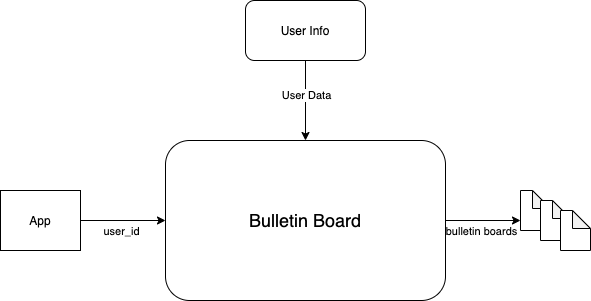
> 用户属性值的上传使用user segment的数据接口 -- user info进行储存,[接口文档点我](https://bp-doc.atcloudbox.com/86hlqZ7CR_q4AoV8oYEuEg)
## 数据结构
```go
type bulletinBoard struct{
tableName struct{} `pg:"bulletin_board"`
ID int `json:"bulletin_id" pg:"id"`
AppID string `json:"-", pg:"app_id"`
Name string `json:"bulletin_name" pg:"name"`
Category string `json:"category" pg:"category"`
Body string `json:"bulletin_body" pg:"body"`
Start int `json:"valid_date_start" pg:"start"`
End int `json:"valid_date_end" pg:"end"`
Condition conditionGroup `json:"bulletin_condition" pg:"condition"`
Enabled bool `json:"enable" pg:"enabled"`
CreatedAt time.Time `json:"created_at" pg:"created_at"`
}
type conditionGroup struct{
Logic string `json:"logic"`
Conditions []condition `json:"conditions"`
}
type condition struct{
Variable string `json:"variable"`
Logic string `json:"logic"`
Target interface{} `json:"target"`
Type string `json:"target_type"`
}
```
## 接口 (http)
### 1. (GET) 获取用户的公告板信息
**client to server**: {bp_server}/bp/bulletin_board
| Required Headers |
| ------------------------- |
| X-BytePower-Sign |
| X-BytePower-Session-Token |
**server to server**: {bp_server}/bp/server/user/{user_id}/bulletin_board
| Required Headers |
| ---------------------- |
| X-BytePower-Auth-Token |
示例输出:
code:200
reponse body:
```json
{
"bulletin_board":[
{
"name":xxx,
"category":xxx,
"body":xxx
}...
]
}
```
code: 400
```json
{
"error": {
"message": "sig_invalid(signature is empty):(signature is invalid)",
"error_type": "sig_invalid"
}
}
```
```json
{
"error": {
"message": "auth_failed(miss jwt token)",
"error_type": "auth_failed"
}
}
```
```json
{
"error": {
"message": "invalid_parameter(user_id is empty)",
"error_type": "invalid_parameter"
}
}
```
## 接口(console交互)
公告的协议(schema):
```json
{
"bulletin_id":1,
"bulletin_name":"",
"category":"",
"bulletin_body":"",
"valid_date_start":123,
"valid_date_end":456,
"enable":true,
"bulletin_condition":{
"logic":"",
"conditions":[
{
"variable":"",
"logic":"",
"target":"不一定是字符串",
"target_type":"target类型由这个来描述,支持string, number, boolean, version这四种"
}...
]
}
}
```
console endpoint:
{console_domain}/api/workspace/{workspace_id}/application/{app_id}/bulletin_board
> 跟appserver config的对页面接口使用了一样的中间件
### 1. 创建一个公告 (POST)
示例输入:
POST {console_domain}/api/workspace/{workspace_id}/application/{app_id}/bulletin_board
request body:
```json
{
"bulletin_name":"a board",
"category":"default",
"bulletin_body":"some body",
"valid_date_start":123,
"valid_date_end":456,
"bulletin_condition":{
"logic":"&&",
"conditions":[
{
"variable":"age",
"logic":"<",
"target":10,
"target_type":"number"
},{
"variable":"app_version",
"logic":">=",
"target":"1.2.3",
"target_type":"version"
}
]
}
}
```
示例输出:
200
### 2. 获取一页公告 (GET)
> 每页的size为10,排序规则为创建时间(created_at)倒序 (这个地方需要优化为更新时间(updated_at)倒序,正在做,但应该不影响平行开发)
示例输入:
GET {console_domain}/api/workspace/{workspace_id}/application/{app_id}/bulletin_board?page=1
示例输出:
200
```json
{
"total":xx,
"boards":[
{
"bulletin_id":1,
"bulletin_name":"a board",
"category":"default",
"bulletin_body":"some body",
"valid_date_start":123,
"valid_date_end":456,
"enable":true,
"bulletin_condition":{
"logic":"&&",
"conditions":[
{
"variable":"age",
"logic":"<",
"target":10,
"target_type":"number"
},{
"variable":"app_version",
"logic":">=",
"target":"1.2.3",
"target_type":"version"
}
]
},
"created_at":xx-xx-xxxx
},{},{}...
]
}
```
### 3. 更新一个公告 (PUT)
示例输入:
PUT {console_domain}/api/workspace/{workspace_id}/application/{app_id}/bulletin_board
request body:
```json
{
"bulletin_id":1,
"bulletin_name":"b board",
"category":"non-default",
"bulletin_body":"some other body",
"valid_date_start":0,
"valid_date_end":456,
"enable":false,
"bulletin_condition":{
"logic":"||",
"conditions":[
{
"variable":"age",
"logic":"==",
"target":10,
"target_type":"number"
},{
"variable":"device_info",
"logic":"==",
"target":"ios",
"target_type":"string"
}
]
}
}
```
示例输出:
200
### 4. 删除一个公告 (DELETE)
示例输入:
DELETE {console_domain}/api/workspace/{workspace_id}/application/{app_id}/bulletin_board
request body:
```json
{
"id":1
}
```
示例输出:
200
## 细节
* 缓存
* 由于公告的数据存放于server数据库,不方便每次查询都去query数据库,所以需要设置合理的缓存。
* 缓存公告板的判断条件(expression),展示给用户的公告板数据(data)与符合当前时间段发放的公告板id(valid ids)。
* 为减少高并发下的缓存读写击穿与穿透,每次从bp server的直接用户或者bp console来的crud操作,都只触发一个缓存原子操作,而不是一系列原子操作。
* console 创建一个公告板 -- cache更新valid ids
* console 更新一个公告板 -- cache删除expression和data
* console 删除一个公告板 -- cache删除valid ids
* 用户读取公告板 -- cache更新expression和data, 更新valid ids(if necessary)
* Expr的数据接口注册
* data provider function要有一个统一的地方注册,这些数据接口要尽量保证被调用时的性能,如果是数据库查询,最好内部有完整的缓存机制。这样被调用时可以确保并发的time cost可控。
## 压测
本地发压,stage收压
100 connections 4 threads 1min

pprof
