219 views
owned this note
Appserver Config (原remote config)方案
=====
## 数据结构
三范式设计拆分
```sql
CREATE TABLE collections
(
collection_id serial primary key,
collection_name varchar(255),
app_id varchar(16),
created_at timestamp,
updated_at timestamp
)
```
```sql
CREATE TABLE configs
(
config_id serial primary key,
collection_id integer,
tag varchar(255)
created_at timestamp,
updated_at timestamp
)
```
```sql
CREATE TABLE commits
(
commit_code serial primary key,
latest bool, #to be removed
config_id integer,
description text,
hash_value varchar(255),
created_at timestamp,
updated_at timestamp,
url varchar(255)
)
```
table结构
```sql
CREATE TABLE public.appserver_config_latest
(
id serial NOT NULL,
app_id character varying(16),
collection_name character varying(255),
config_id character varying(16),
commit_code integer,
description text,
hash_value text,
tag text,
created_at timestamp with time zone DEFAULT now(),
updated_at timestamp with time zone DEFAULT now(),
url text,
operation_user text,
CONSTRAINT appserver_config_latest_pkey PRIMARY KEY (id)
);
CREATE UNIQUE INDEX ASCL_appid_collectionname_configid_idx ON appserver_config_latest (app_id, collection_name, config_id);
```
```sql
CREATE TABLE public.appserver_config_history
(
id serial NOT NULL,
app_id character varying(16),
collection_name character varying(255),
config_id character varying(16),
commit_code integer,
description text,
hash_value text,
tag text,
created_at timestamp with time zone DEFAULT now(),
updated_at timestamp with time zone DEFAULT now(),
url text,
operation_user text,
CONSTRAINT appserver_config_history_pkey PRIMARY KEY (id)
);
CREATE UNIQUE INDEX ASCH_appid_collectionname_configid_commitcode_idx ON appserver_config_history (app_id, collection_name, config_id, commit_code);
```
```sql
CREATE TABLE public.appserver_config_released
(
id serial NOT NULL,
app_id character varying(16),
collection_name character varying(255),
config_id character varying(16),
commit_code integer,
description text,
hash_value text,
tag text,
created_at timestamp with time zone DEFAULT now(),
updated_at timestamp with time zone DEFAULT now(),
released_at timestamp with time zone DEFAULT now(),
url text,
operation_user text,
CONSTRAINT appserver_config_released_pkey PRIMARY KEY (id)
);
CREATE UNIQUE INDEX ASCR_appid_collectionname_configid_idx ON appserver_config_released (app_id, collection_name, config_id);
```
```sql
CREATE TABLE public.appserver_config_deletion_record
(
deleted_id serial NOT NULL,
app_id character varying(16),
collection_name character varying(255),
config_id character varying(16),
commits integer,
description text,
tag text,
created_at timestamp with time zone DEFAULT now(),
deleted_at timestamp with time zone DEFAULT now(),
url text,
operation_user text,
CONSTRAINT appserver_config_deletion_record_pkey PRIMARY KEY (deleted_id)
);
CREATE INDEX ASCD_appid_collectionname_configid_idx ON appserver_config_deletion_record (app_id, collection_name, config_id);
```
```sql
CREATE TABLE public.appserver_config_collections
(
collection_id serial,
app_id character varying(16),
collection_name character varying(40),
created_at timestamp with time zone,
updated_at timestamp with time zone,
CONSTRAINT appserver_config_collections_pkey PRIMARY KEY (collection_id)
);
CREATE UNIQUE INDEX ASCCollections_appid_collectionname_idx ON appserver_config_collections (app_id, collection_name)
```
```go
type config struct{
ID int `pg:"id,pk" json:"-"`
CollectionName string `pg:"collection_name" json:"collection_name"` //1
ConfigID int `pg:"config_id" json:"config_id"`
Description string `pg:"description" json:"description"`
HashValue string `pg:"hash_value" json:"hash_value"`
CommitCode int `pg:"commit_code" json:"commit_code"`
Tag string `pg:"tag" json:"tag"`
CreatedAt time.Time `pg:"created_at" json:"created_at"`
UpdatedAt time.Time `pg:"updated_at" json:"updated_at"`
ConfigFile struct{
Name string `json:"name"`
URL string `json:"url"`
Size int `json:"size"`
Ext string `json:"ext"`
CreatedAt time.Time `json:"created_at"`
}`pg:"-" json:"config_file"`
}
type deletedRecord struct {
tableName struct{} `pg:"appserver_config_deletion_record"`
DeletedID int `pg:"deleted_id,pk" json:"deleted_id"`
AppID string `pg:"app_id" json:"app_id"`
CollectionName string `pg:"collection_name" json:"collection_name"`
ConfigID string `pg:"config_id" json:"config_id"`
Commits int `pg:"commits" json:"commits"`
Tag string `pg:"tag" json:"tag"`
Description string `pg:"description" json:"description"`
URL string `pg:"url" json:"url"`
OperationUser string `pg:"operation_user" json:"operation_user"`
CreatedAt time.Time `pg:"created_at" json:"created_at"`
DeletedAt time.Time `pg:"deleted_at" json:"deleted_at"`
}
type collectionModel struct {
tableName struct{} `pg:"appserver_config_collections"`
CollectionID string `pg:"collection_id,pk" json:"collection_id"`
AppID string `pg:"app_id" json:"app_id"`
CollectionName string `pg:"collection_name" json:"collection_name"`
CreatedAt time.Time `pg:"created_at" json:"created_at"`
UpdatedAt time.Time `pg:"updated_at" json:"updated_at"`
Count int `pg:"-" json:"count"`
}
```
变化:1
1. 之前的形式是一个collection一张表,现在想要设计成一个表来保存所有collection的所有数据
## 外部接口
> 以下接口全部为console的对外接口,特殊标识为to_be_deprecated是即将弃用的接口,server的接口也会在appserver config上线后被console取缔,所以不再在此列出。
> 另:appserver config的console接口全部是接收token访问的。
### 01 GET {bp_console_domain}/appserver_config/app_id/{app_id}
to_be_deprecated: {bp_console_domain}/remote_config/{app_id}
获取app下的所有collection name (app_id 由hostname获取)
示例输出:
```json
{
"appserver_config":{
"collections":[
"bytepower_test1",
"bytepower_test2",
...
]
}
}
```
### 02 GET {bp_console_domain}/appserver_config/app_id/{app_id}/collection/{collection_name}
to_be_deprecated: {bp_console_domain}/remote_config/{app_id}/{collection_name}
获取{collection_name}下的config array
response变化:之前array每个元素的多层json结构 改为了 扁平json结构的array
示例输出:
```json
{
"appserver_config":{
"collection_name":"bytepower_test",
"configs":[
{
"config_id": 1,
"collection_name": "bytepower_test",
"description": "test",
"hash_value": "xxx",
"latest": false,
"commit_code": 1,
"tag": "",
"created_at": "2020-08-20 06:29:44.395+00",
"updated_at": "2020-08-20 06:29:44.395+00",
"config_file":{
"name": "1_1.json"
"size": 122.95,
"ext": "json",
"url": "http://xxx/1_1.json",
"created_at": "2020-08-20 06:29:44.395+00"
}
},{},{}...
]
}
}
```
### 03 GET {bp_console_domain}/appserver_config/app_id/{app_id}/collection/{collection_name}/latest
to_be_deprecated: {bp_console_domain}/remote_config/{app_id}/{collection_name}/latest
获取{collection_name}下各个最新版本config的array
response变化:之前array每个元素的多层json结构 改为了 扁平json结构的array
示例输出:
```json
{
"appserver_config":{
"collection_name":"bytepower_test",
"configs":[
{
"config_id": 999,
"collection_name": "bytepower_test",
"description": "test",
"hash_value": "xxx",
"latest": true,
"commit_code": 3,
"tag": "",
"created_at": "2020-08-20 06:29:44.395+00",
"updated_at": "2020-08-20 06:29:44.395+00",
"config_file":{
"name": "999_3.json"
"size": 122.95,
"ext": "json",
"url": "http://xxx/999_3.json",
"created_at": "2020-08-20 06:29:44.395+00"
}
},{},{}...
]
}
}
```
### 04 GET {bp_console_domain}/appserver_config/app_id/{app_id}/collection/{collection_name}/config_id/{config_id}/latest
to_be_deprecated: {bp_console_domain}/remote_config/{app_id}/{collection_name}/config_id/{config_id}
获取{collection_name}下最新的config
示例输入:
示例输出:
```json
{
"appserver_config":{
"collection_name":"bytepower_test",
"configs":[
{
"config_id": 1,
"collection_name": "bytepower_test",
"description": "test",
"hash_value": "xxx",
"latest": true,
"commit_code": 2,
"tag": "",
"created_at": "2020-08-20 06:29:44.395+00",
"updated_at": "2020-08-20 06:29:44.395+00",
"config_file":{
"name": "1_2.json"
"size": 122.95,
"ext": "json",
"url": "http://xxx/1_2.json",
"created_at": "2020-08-20 06:29:44.395+00"
}
}
]
}
}
```
### 05 GET {bp_console_domain}/appserver_config/app_id/{app_id}/collection/{collection_name}/count
to_be_deprecated: {bp_console_domain}/remote_config/{app_id}/{collection_name}/count
获取{collection_name}下config的总数量
无变化
### 06 PUT {bp_console_domain}/appserver_config/app_id/{app_id}/collection/{collection_name}/config_id/{config_id}
to_be_deprecated: {bp_console_domain}/remote_config/{app_id}/{collection_name}/{config_id}
更新{collection_name}下最新的config
无变化
示例输入:
```json
{
"description":"new_description",
"tag":"new_tag",
"hash_value":"new_hash_value"
}
```
示例输出:
```json
{
"appserver_config":{
"collection_name":"bytepower_test",
"configs":[
{
"config_id": 999,
"collection_name": "bytepower_test",
"description": "new_description",
"hash_value": "new_hash_value",
"latest": true,
"commit_code": 4,
"tag": "new_tag",
"created_at": "2020-08-20 06:29:44.395+00",
"updated_at": "2020-08-21 11:29:44.395+00",
"config_file":{
"name": "999_4.json"
"size": 122.95,
"ext": "json",
"url": "http://xxx/999_4.json",
"created_at": "2020-08-20 06:29:44.395+00"
}
}
]
}
}
```
### 07 POST {bp_console_domain}/appserver_config/revoke
to_be_deprecated: {bp_console_domain}/remote_config/revoke
将config_id的配置revoke到哪个commit_id的版本
示例输入:
```json
{
"app_id":xxx,
"collection_name":"bytepower_test",
"commit_code":3,
"config_id":999
}
```
示例输出:
```json
{
"appserver_config":{
"collection_name":"bytepower_test",
"configs":[
{
"config_id": 999,
"collection_name": "bytepower_test",
"description": "xxx",
"hash_value": "xxx",
"latest": true,
"commit_code": 5,
"tag": "new_tag",
"created_at": "2020-08-20 06:29:44.395+00",
"updated_at": "2020-08-21 11:29:44.395+00",
"config_file":{
"name": "999_5.json"
"size": 122.95,
"ext": "json",
"url": "http://xxx/999_5.json",
"created_at": "2020-08-21 11:29:44.395+00"
}
}
]
}
}
```
### 08 POST {bp_console_domain}/appserver_config/commit/single
to_be_deprecated: {bp_console_domain}/remote_config/commit/single
创建一条新的config
示例输入:
```http
POST {bp_console_domain}/appserver_config/commit/single HTTP/1.1
Host: xxx
Content-Length: xxx
Content-Type: multipart/form-data; boundary=----WebKitFormBoundaryabcd
----WebKitFormBoundaryabcd
Content-Disposition: form-data; name="app_id"
app1
----WebKitFormBoundaryabcd
Content-Disposition: form-data; name="collection_name"
bytepower_test
----WebKitFormBoundaryabcd
Content-Disposition: form-data; name="config_id"
999
----WebKitFormBoundaryabcd
Content-Disposition: form-data; name="description"
whatever
----WebKitFormBoundaryabcd
Content-Disposition: form-data; name="hash_value"
whatever
----WebKitFormBoundaryabcd
Content-Disposition: form-data; name="tag"
whatever
----WebKitFormBoundaryabcd
Content-Disposition: form-data; name="config_file"; filename="xxx.json"
Content-Type: <Content-Type header here>
(data)
----WebKitFormBoundaryabcd
```
示例输出:
```json
{
"appserver_config":{
"collection_name":"bytepower_test",
"configs":[
{
"config_id": 999,
"collection_name": "bytepower_test",
"description": "whatever",
"hash_value": "whatever",
"latest": true,
"commit_code": 5,
"tag": "whatever",
"created_at": "2020-08-20 06:29:44.395+00",
"updated_at": "2020-08-20 06:29:44.395+00",
"config_file":{
"name": "999_5.json",
"size": 122.95,
"ext": ".json",
"url": "http://xxx/999_5.json",
"created_at": "2020-08-20 06:29:44.395+00"
}
}
]
}
}
```
### 09 GET {bp_console_domain}/appserver_config_file/app_id/{app_id}/collection/{collection_name}/config_id/{config_id}/latest
to_be_deprecated: {bp_console_domain}/remote_config_file/{app_id}/{collection_name}/{config_id}
获取{collection_name}下最新config的文件content
示例输出:
```
file_content...
```
### 10 GET {bp_console_domain}/appserver_config_file/app_id/{app_id}/collection/{collection_name}/config_id/{config_id}/{commit_code}
to_be_deprecated: {bp_console_domain}/remote_config_file/{app_id}/{collection_name}/{config_id}/{commit_code}
获取{collection_name}下指定commit_code的config文件content
示例输出:
```
file_content...
```
### 11 POST {bp_console_domain}/appserver_config/commit/multiple
to_be_deprecated: {bp_console_domain}/remote_config/commit/multiple
创建多条新的config
prerequisite:
* 创建一个描述文件,并命名为manifest.json,描述内容为即将上传的每个config file的属性,详见下示例。(description, tag, hash_value都不是mandatory)
* 将描述文件与所有需要上传的文件一起以zip格式压缩成包。
* 压缩包文件的命名为文件的MD5 checksum,例如c371ad384e031619fc99b9338d847bc6.zip
manifest.json
```json
[
{
"collection_name":"walk_configs",
"config_id":"16",
"description":"test",
"tag":"xx",
"file_name":"16.json"
},
{
"collection_name":"walk_configs",
"config_id":"15",
"description":"新增配置15",
"hash_value":"xx",
"file_name":"15.json"
}
]
```
示例输入
```http
POST (console)/appserver_config/commit/multiple HTTP/1.1
Host: xxx
Content-Length: xxx
Content-Type: multipart/form-data; boundary=----WebKitFormBoundaryabcd
----WebKitFormBoundaryabcd
Content-Disposition: form-data; name="app_id"
app1
----WebKitFormBoundaryabcd
Content-Disposition: form-data; name="zip_file"; filename="xxx.zip"
Content-Type: <Content-Type header here>
(data)
----WebKitFormBoundaryabcd
```
示例输出
```json
{
"appserver_config": {
"configs": [
{
"collection_name": "walk_configs",
"commit_code": 3,
"config_file": {
"name": "16_3.json",
"url": "https://localhost:5671/remote_config_file/APPQRHLW6JOXCLQ3/walk_configs/16/3"
},
"config_id": 16,
"created_at": "2021-02-09T18:13:13.00946+08:00",
"description": "test",
"hash_value": "0272f9b7fe677931b2a4131e6489ec1042ef63142714b0e2d65ed79615dec98a",
"latest": true,
"tag": "",
"updated_at": "2021-02-09T18:13:13.00946+08:00"
},
{
"collection_name": "walk_configs",
"commit_code": 3,
"config_file": {
"name": "15_3.json",
"url": "https://localhost:5671/remote_config_file/APPQRHLW6JOXCLQ3/walk_configs/15/3"
},
"config_id": 15,
"created_at": "2021-02-09T18:13:13.220874+08:00",
"description": "新增配置15",
"hash_value": "fb017fb434d6165fc127683f132f5721cc23becbe0b32210bf4d342a53cd14ff",
"latest": true,
"tag": "",
"updated_at": "2021-02-09T18:13:13.220874+08:00"
}
]
}
}
```
### 12 POST {bp_console_domain}/appserver_config_file/app_id/{app_id}/collection/{collection_name}
to_be_deprecated: {bp_console_domain}/remote_config_file/{app_id}/{collection_name}
根据请求体中的config id,获取包含多个config file的压缩包。
示例输入
```json
[
"16","15"
]
```
输出为一个zip包,以md5 checksum命名,包内包含manifest描述文件。
### 13 GET {bp_console_domain}/appserver_config/app_id/{app_id}/collection/{collection_name}/released
获取指定collection下的所有released的config信息
示例输出:
```json
{
"appserver_config":{
"configs":[
...
]
}
}
```
### 14 GET {bp_console_domain}/appserver_config_file/app_id/{app_id}/collection/{collection_name}/config_id/{config_id}/released
获取指定collection下指定config_id的released文件内容
示例输出:
```
file_content ...
```
## console页面接口
### 页面接口prefix {console_domain}/api/workspace/{spaceID}/application/{appID}/appserver_config
### 01 GET ~/collection
获取App下所有collection,用来load下拉菜单
### 02 GET ~/collection?page={page_number}
获取App的collection页,每页大小为10
### 03 POST ~/collection
创建新的collection
body:
```json
{
"collection_name":xxx
}
```
### 04 DELETE ~/collection
删除一个collection
body:
```json
{
"collection_id":xxx
}
```
### 05 PUT ~/collection
更新一个collection的命名
body:
```json
{
"collection_id":xxx,
"collection_name":xxx
}
```
### 05.extra POST ~/check_collection_name
查看collection name是否已存在
body:
```json
{
"collection_name":xxx
}
```
### 06 GET ~/config_base_page?collection_name={collection_name}&page={page_number}
获取一个collection下的config页面
### 07 GET ~/config_detail_page?collection_name={collection_name}&config_id={config_id}&page={page_number}
获取一个config的详细信息页面
### 08 POST ~/config
上传一个新的config
```http
POST (console)/workspace/SPACEXUFLNY2NZS4IS/application/APPYXGMNY2NC4WGN/ HTTP/1.1
Host: xxx
Content-Length: xxx
Content-Type: multipart/form-data; boundary=----WebKitFormBoundaryabcd
----WebKitFormBoundaryabcd
Content-Disposition: form-data; name="collection_name"
test_bytepower_1
----WebKitFormBoundaryabcd
Content-Disposition: form-data; name="config_id"
567
----WebKitFormBoundaryabcd
Content-Disposition: form-data; name="description"
xxx
----WebKitFormBoundaryabcd
Content-Disposition: form-data; name="hash_value"
xxx
----WebKitFormBoundaryabcd
Content-Disposition: form-data; name="tag"
xxx
----WebKitFormBoundaryabcd
Content-Disposition: form-data; name="config_file"; filename="xxx.json"
Content-Type: <Content-Type header here>
(data)
----WebKitFormBoundaryabcd
```
### 09 PUT ~/config
更新一个config的meta信息
```json
{
"collection_name":xxx,
"config_id":xxx,
"description":xxx,
"tag":xx
}
```
### 10 DELETE ~/config
删除一个config的所有历史
```json
{
"colleciton_name":xxx,
"config_id":xxx
}
```
### 11 POST ~/configs
上传一个zip包来进行批量上传
*注意,zip包的名需要以改包的md5命名。包内不再需要manifest文件来描述,但是文件名需为数字,也就是config_id
```http
POST (console)/workspace/SPACEXUFLNY2NZS4IS/application/APPYXGMNY2NC4WGN/ HTTP/1.1
Host: xxx
Content-Length: xxx
Content-Type: multipart/form-data; boundary=----WebKitFormBoundaryabcd
----WebKitFormBoundaryabcd
Content-Disposition: form-data; name="collection_name"
xxx
----WebKitFormBoundaryabcd
Content-Disposition: form-data; name="zip_file"; filename="md5.zip"
Content-Type: <Content-Type header here>
(data)
----WebKitFormBoundaryabcd
```
### 12 GET ~/config_file?collection_name={colleciton_name}&config_id={config_id}&commit_code={commit_code}
指定collection name,config id与commit code来获取该记录的config file
### 13 POST ~/release
发布一个config
```json
{
"collection_name":xxx,
"config_id":xxx
}
```
### 14 POST ~/release_all
将colleciton下的config全部发布
```json
{
"collection_name":xxx
}
```
### 15 GET ~/deleted_config_page?page={page_number}
获取已删除config的页面
### 16 GET ~/deleted_config_file?deleted_id={deleted_id}
根据deleted_id获取已被删除的config文件zip包。
## 压测数据(stage)
发压受压同机 (接口01)

发压受压不同机(发压机为本机) (接口01)

发压受压同机 (接口02)

发压受压不同机(发压机为本机) (接口02)

发压受压同机 (接口03)

发压受压不同机(发压机为本机) (接口03)

[pprof](/uploads/upload_f35a617061487c69c6ea9bbc98b770cb.svg)
## config文件管理
config文件通过s3来保存
在s3上的dev-bytepower bucket,bucket下{app_id}/remote_config文件夹中每个文件夹代表一个collection,不断更迭版本的config文件存放在这个文件夹下, config文件命名:{config_id}_{commit_code}.{ext}
config文件保存在s3上的url示例: https://dev-bytepower.s3.cn-northwest-1.amazonaws.com.cn/app_data/{app_id}/remote_config/bytepower_test/999_3.json
```s3
>bucket
>app_data
>app_id
>remote_config
>collections
>files
dev-bytepower/
app_data/
app_id/
remote_config/
coin/
bytepower_test/
amber_configs/
1_1.json
2_1.json
2_2.json
2_3.json
...
amber_satisfaction/
amber_withdraw_configs/
...
```
## 向appserver config过渡keynote
### 过渡期:
1. database -- 将原有的两个table:remote_config_latest和remote_config_history的数据copy到新table: appserver_config_latest和appserver_config_history下
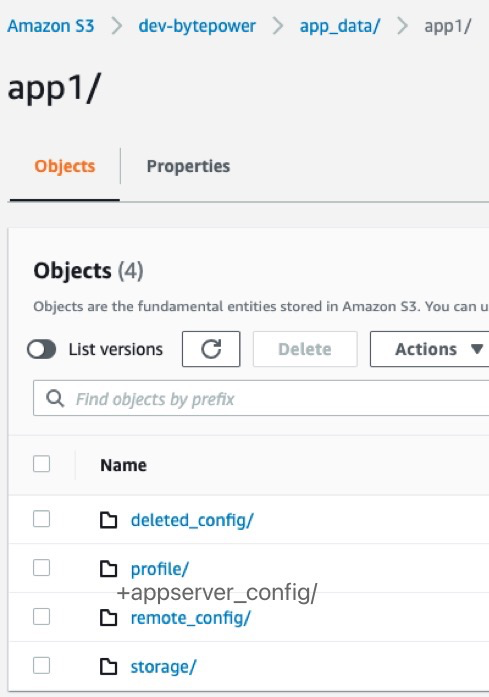
2. s3 -- remote config文件夹下的文件保持不动,appserver config上线后,新上传的config文件会全部保存至appserver config文件夹下
3. response -- 从兼容性出发,过渡期的response会从旧的格式(remote_config为key的json)变更为新的格式(有remote_config和appserver_config两个key的json,且内部内用完全相同)
```json
{
"remote_config":{
"我是内容"
}
}
```
```json
{
"remote_config":{
"我是内容"
},
"appserver_config":{
"我是内容"
}
}
```
4. api接口 -- 旧的remote_config提供的api接口都可以照常使用直至过渡期结束,但是写入的记录都会记录到新的table和文件路径中去。
### 不忘初心的收尾期
1. database -- 将copy到新table下的remote_config时期的数据,其中s3路径信息更新至appserver_config。
2. s3 -- 将remote_config文件夹下的config file全部迁移至appserver_config文件夹中,使db中的记录保持有效性。
3. response -- 由`remote_config`与`appserver_config`并存的格式变为只有`appserver_config`为key的格式。
4. api接口 -- bp server的endpoint不再提供,bp console的/remote_config/... endpoint移除,只留/appserver_config/...
## BytePower Server 接口
- 获取最新 Released 配置信息
```
{server_domain}/bp/server/appserver_config/{collection_name}/latest
## 示例 Appserver Config Get Released
curl "http://test-app.bp-server.atcloudbox.com/bp/server/appserver_config/test_collection_2/latest" \
-H 'Accept: application/vnd.bytepower.v1+json' \
-H 'X-BytePower-Application-Id: APPJMPKTO4NID2KT'
```